Vector DB Connector
The Vector DB Connector facilitates semantic search over documents stored in a vector database. It allows you to retrieve relevant information based on the meaning of a query rather than relying only on exact keyword matches. It simplifies the process of searching stored documents using similarity thresholds, result limits, and optional metadata filters within your flows.
- The Vector DB Connector is supported only in Agentic-type projects.
- The connector currently supports the Read operation for performing semantic similarity searches.
- A Vector Store datasource must be configured before using the connector.
Configuration
To configure the Vector DB Connector, follow these steps:
-
Drag and drop the Vector DB Connector from the connectors panel onto your design canvas. Give the node a descriptive name.

-
Right-click on the connector node to access its configuration properties. You will define the following parameters.
General Settings
| Fields | Description | Example |
|---|---|---|
| Datasource Name | The name of the Vector Store datasource configured in the connection properties. This datasource provides access to the vector database and is a mandatory field. | shop |
| Mode | Specifies the operation to perform on the vector database. The connector currently supports the read mode for semantic similarity searches. | read |
Input Configuration
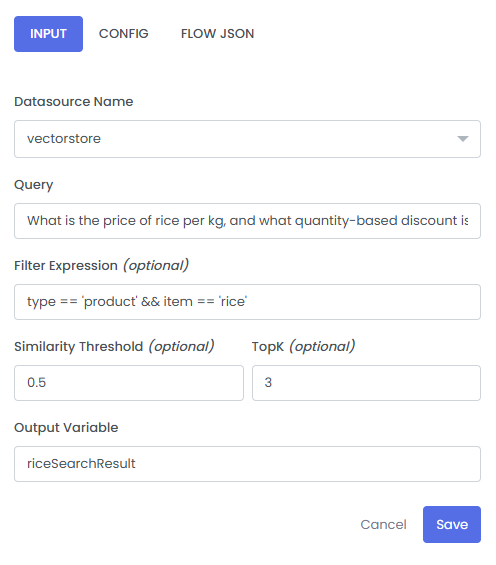
The Vector DB Connector uses a query to search for relevant documents stored in the vector database. The query can be provided as static text or dynamically retrieved from a pipeline variable. You can also specify a similarity threshold, the maximum number of results to retrieve, and an optional metadata filter to refine the search.
| Fields | Description | Example |
|---|---|---|
| Query | The text used to search for relevant documents based on semantic similarity. The query can be provided as static text or dynamically retrieved from a pipeline variable using the $ prefix. Pipeline variables are resolved before the search is performed. | What is the price of rice per kg, and what quantity-based discount is available? |
| Top K | The maximum number of matching documents requested from the similarity search. If not specified, the default value is 4. | 3 |
| Similarity Threshold | The minimum similarity score required for a document to be included in the search results. The value ranges from 0.0 to 1.0. If not specified, the default value is 0.0. | 0.5 |
| Filter Expression | An optional expression used to filter documents based on their metadata. This allows you to narrow the search to documents matching specific conditions. Pipeline variables in the expression are resolved before the search is performed. | type == 'product' && item == 'rice' |
- Query can be provided as static text or as a reference to a pipeline variable, such as
$SEARCH_QUERY. - When a pipeline variable is used, its value is resolved before the semantic search is performed.
- The example configuration uses a static query.
- Top K controls the maximum number of documents requested from the similarity search.
- Similarity Threshold helps exclude documents with similarity scores below the configured threshold.
- Filter Expression is optional and can be used to restrict the search to documents with specific metadata values.
Example Configuration
Consider a shop vector database containing product information and discount rules. The following example retrieves pricing and discount information for rice.
| Fields | Value |
|---|---|
| Datasource Name | shop |
| Mode | read |
| Query | What is the price of rice per kg, and what quantity-based discount is available? |
| Top K | 3 |
| Similarity Threshold | 0.5 |
| Filter Expression | type == 'product' && item == 'rice' |
For this example, the vector database contains the following document:
Item Rice costs 60 INR per kg with 5 percent discount if quantity exceeds 10 kg
The connector searches for relevant documents and returns matching content according to the configured query, similarity threshold, Top K, and metadata filter.
Output Configuration
The Vector DB Connector stores the search results in the configured output variable. It also creates an additional output containing document details and the search status.
| Fields | Description | Example |
|---|---|---|
| Output Variable | The name of the variable where the combined text content of the matching documents will be stored. Multiple document contents are separated by ---. | riceSearchResult |
| Additional Output | An additional variable generated automatically by appending _OTH to the configured output variable name. It contains document IDs, similarity scores, metadata, and the response status. | riceSearchResult_OTH |
For example, if the configured output variable is riceSearchResult, the connector produces the following outputs.
1. Main Output
The main output contains the text content of the matching documents.
Item Rice costs 60 INR per kg with 5 percent discount if quantity exceeds 10 kg